
परिचय
Sewayojan Interview Call 2026 भाई, क्या आपने Sewayojan Portal पर application submit किया है और अब इंतज़ार कर रहे हैं कि interview call आए या नहीं? या आपको call आ गया है लेकिन आपको समझ नहीं आ रहा कि आगे क्या करें? 2026 में interview call process थोड़ा बदल गया है। इस guide में हम आपको interview call का मतलब, status check करने का तरीका, और आगे की process के बारे में विस्तार से बताएंगे। Important: हम official UP Government site नहीं हैं, बल्कि एक independent guide हैं। Official portal है sewayojan.up.nic.in — जहाँ आपको interview call का status check करना है।
Interview Call Kya Hai Aur Kyon Important Hai?
देखो दोस्तों, Interview Call एक औपचारिक निमंत्रण (formal invitation) है जो आपको interview में participate करने के लिए मिलता है। इसका मतलब है कि आपका application shortlist हो गया है और अब आप अगले round के लिए qualified हैं।
Interview Call कब मिलता है?
-
Application submit करने के बाद
-
Shortlist process complete होने के बाद
-
Written exam (अगर है) clear करने के बाद
-
Documents verification के बाद
Interview Call में क्या होता है?
-
Interview की date, time, और venue बताई जाती है
-
Admit Card/Call Letter download करने का link दिया जाता है
-
Documents की list दी जाती है (क्या-क्या लेकर जाना है)
-
Instructions दी जाती है (क्या पहनना है, कितने समय पहले पहुँचना है, आदि)
Interview Call Kaise Aati Hai?
Sewayojan Portal पर interview call आने के तीन मुख्य तरीके हैं:
1. Email (ईमेल)
-
आपके registered email ID पर official notification आता है
-
Email में interview details और call letter download link होता है
-
Spam/Junk folder भी check करें — कभी-कभी email वहाँ चली जाती है
2. SMS (मोबाइल संदेश)
-
आपके registered mobile number पर SMS आता है
-
SMS में short message होता है — “Your interview call letter is available on portal”
-
SMS में admit card download का link या instructions होते हैं
3. Portal Dashboard (पोर्टल पर)
-
सबसे important way — आपका dashboard update होता है
-
Application status “Shortlisted for Interview” में बदल जाता है
-
Call letter download का option आ जाता है
Interview Call Status: Kaise Check Karein?
अब आते हैं सबसे important part पर — interview call का status कैसे check करें:
Step 1: Portal par Login Karein
-
Official portal
sewayojan.up.nic.inपर जाएँ -
अपने Username और Password से login करें
Step 2: Dashboard par Jaayein
-
Login करने के बाद Dashboard पर जाएँ
-
Dashboard पर “My Applications” या “Application Status” section ढूंढें
Step 3: Application Status Check Karein
-
वहाँ आपको अपने सारे applications की list दिखेगी
-
हर application के आगे status लिखा होता है:
-
“Submitted” — Form submit हो गया है
-
“Under Review” — Application check हो रहा है
-
“Shortlisted for Interview” — Congratulations! Interview call आ गई है
-
“Rejected” — Application reject हो गया (किसी कारण से)
-
Step 4: Call Letter Download Karein
-
अगर status “Shortlisted for Interview” है, तो “Download Call Letter” या “Download Admit Card” option होगा
-
Call letter download करें और printout निकालें
-
Call letter को interview के दिन साथ ले जाना mandatory है
Step 5: Check Interview Details
-
Call letter पर date, time, venue — सब कुछ लिखा होता है
-
Instructions भी पढ़ें — क्या लेकर जाना है, कैसे पहुँचना है
-
Interview से कम से कम 30 मिनट पहले पहुँचना है
Interview Call Status Categories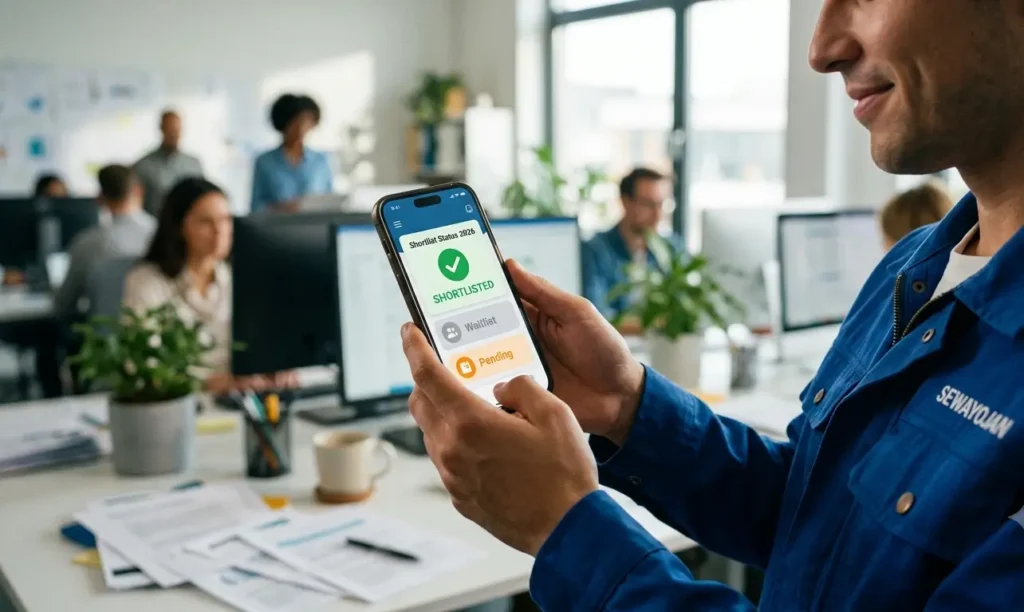
| Status | Meaning | What to Do |
|---|---|---|
| Submitted | Application submit हो गया है | Wait for review |
| Under Review | Documents/eligibility check हो रहा है | Wait patiently |
| Shortlisted for Interview | Interview के लिए चुने गए हैं | Download call letter, prepare |
| Waitlisted | Reserve list में हैं (अगर कोई नहीं आता तो बुलाया जा सकता है) | Wait for further intimation |
| Rejected | किसी कारण से reject | Apply for other vacancies |
| Selected | Final selection हो गया है | Congratulations! Prepare for joining |
| Not Selected | Interview के बाद select नहीं हुए | Apply for other vacancies |
Interview Call Aane Ke Baad Kya Karein?
Interview call आ जाए तो ये steps follow करें:
1. Call Letter Download Karein
-
तुरंत call letter download करें
-
2-3 printouts निकालें (extra copy emergency के लिए)
-
Call letter को safe place पर रखें
2. Interview Date Note Karein
-
Date, time, venue — अपने calendar में mark करें
-
Mobile reminder set करें (1 day और 1 hour पहले के लिए)
3. Documents Arrange Karein
-
Call letter पर documents की list दी होती है
-
उन सारे documents को original + photocopies में arrange करें
4. Interview Preparation Karein
-
Job description फिर से पढ़ें
-
Common interview questions की practice करें
-
Company/department के बारे में research करें
5. Venue Check Karein
-
Google Maps पर venue check करें
-
Reach time estimate करें (traffic के according)
-
एक day पहले dry run करें (अगर संभव हो)
6. Dress Ready Rakhein
-
Formal dress को एक day पहले iron करके रखें
-
Shoes clean करें
Interview Call Related Common Questions
Q: अगर मुझे interview call नहीं आई तो क्या करें?
A: Portal पर application status check करें। अगर status “Rejected” है तो किसी और vacancy पर apply करें। अगर “Under Review” है तो wait करें।
Q: Interview call कितने दिन में आती है?
A: Application submit करने के बाद आमतौर पर 2-6 हफ्ते में (vacancy और department के according)। बड़ी recruitments में 2-3 महीने भी लग सकते हैं।
Q: क्या मैं interview के लिए reschedule कर सकता हूँ?
A: ज़्यादातर मामलों में नहीं। सरकारी jobs में interview date fixed होती है। अगर बहुत ज़रूरी है तो department को contact करें लेकिन chances कम हैं।
Q: Interview के लिए क्या-क्या documents ले जाना है?
A: Call letter पर list दी होती है। आमतौर पर — Call letter (printout), Resume, 10th/12th/Graduation certificates (original + copies), Caste certificate, Domicile, Aadhaar, Photos, Experience letters (if any).
Q: अगर मैं interview की date पर नहीं पहुँच पाया तो क्या होगा?
A: आपका application cancel हो जाता है। No rescheduling (ज़्यादातर मामलों में)। इसलिए समय पर पहुँचना बहुत ज़रूरी है।
Q: क्या interview call के बाद कोई exam भी होता है?
A: कुछ vacancies में interview से पहले written exam होता है। Notification में selection process साफ लिखा होता है। Call letter पर भी instructions होती हैं।
Q: क्या मैं interview call को किसी और को transfer कर सकता हूँ?
A: बिल्कुल नहीं! Interview call non-transferable है। सिर्फ वही व्यक्ति जिसके name पर call आई है, वही interview दे सकता है।
Q: Interview call का status SMS/email पर नहीं आया लेकिन portal पर दिख रहा है?
A: कभी-कभी SMS/email में delay हो सकती है। Portal को primary source मानें। अगर portal पर status दिख रहा है तो आपको interview call मिल गई है।
Q: क्या interview call का status हर दिन check करना चाहिए?
A: हाँ, खासकर notification की expected date के आस-पास। Daily एक बार portal check करें। SMS/email alerts ON रखें ताकि notification miss न हो।
Common Problems & Quick Fixes
Interview call से related common problems और उनके solutions:
Problem 1: Portal पर “Shortlisted” नहीं दिख रहा
Fix: Browser refresh करें या clear cache करें। दूसरे browser में try करें। अगर फिर न दिखे तो 2-3 दिन wait करें (सभी applications एक साथ update नहीं होतीं)।
Problem 2: Call Letter Download नहीं हो रहा
Fix: Browser pop-up blocker OFF करें। दूसरे browser या incognito mode में try करें। PDF viewer (Adobe Acrobat) install है क्या? अगर न हो तो download विकल्प पर right click करें और “Save link as” select करें।
Problem 3: SMS/Email नहीं आया
Fix: Spam/Junk folder check करें। Portal पर login करके status देखें — portal सबसे reliable source है। Phone number और email ID सही है क्या — check करें।
Problem 4: Date/Time Confusion
Fix: Call letter पर स्पष्ट रूप से date, time, venue लिखा होता है। 2-3 बार पढ़ें। अगर कन्फ्यूजन है तो helpline पर call करें — 155330 या 0522-2638995।
Problem 5: Venue का पता नहीं चल रहा
Fix: Google Maps पर search करें। अगर छोटा शहर/गाँव है तो local log से पूछें। एक दिन पहले venue का पता चेक करें ताकि interview के दिन tension न हो।
Problem 6: Interview Date Clash
Fix: अगर दो interviews की date एक ही है तो priority decide करें। जो job ज़्यादा important है, उसे choose करें। अगर दोनों बहुत important हैं तो किसी एक department को contact करें (लेकिन chances कम हैं)।
Interview Call Checklist
| Item | Check |
|---|---|
| Portal पर login करके status check किया | ☐ |
| Call letter download किया | ☐ |
| Call letter का printout निकाला (2 copies) | ☐ |
| Interview date, time, venue note किया | ☐ |
| Mobile reminder set किया | ☐ |
| Documents arranged (original + photocopies) | ☐ |
| Formal dress ready रखी | ☐ |
| Venue map/direction check किया | ☐ |
| Interview preparation done | ☐ |
| Helpline number saved (155330) | ☐ |
FAQs (अक्सर पूछे जाने वाले सवाल)
Q: Interview call क्या होता है?
A: Interview call एक formal invitation है जो आपको interview में participate करने के लिए मिलता है। ये बताता है कि आप shortlist हो गए हैं।
Q: Interview call का status कहाँ check करें?
A: Sewayojan Portal (sewayojan.up.nic.in) पर login करें, dashboard पर “My Applications” या “Application Status” में देखें।
Q: Interview call SMS पर क्यों नहीं आ रहा?
A: SMS में delay हो सकता है या आपके नंबर पर DND active हो सकता है। Portal पर login करके status check करें — ये सबसे reliable तरीका है।
Q: Interview call आने के बाद क्या करें?
A: Call letter download करें, printout निकालें, documents arrange करें, interview की preparation करें, और समय पर venue पहुँचें।
Q: अगर मुझे interview call नहीं आई तो क्या करें?
A: Portal पर status check करें। अगर “Rejected” है तो किसी और vacancy पर apply करें। अगर “Under Review” है तो wait करें।
Q: क्या interview call के लिए कोई fee लगती है?
A: नहीं, interview call free है। अगर कोई पैसे माँगे तो वो scam है।
Q: क्या मैं interview call की date change कर सकता हूँ?
A: ज़्यादातर मामलों में नहीं। सरकारी jobs में interview dates fixed होती हैं। बहुत ज़रूरी हो तो department को contact करें।
Q: Interview के लिए कितने documents लेकर जाएँ?
A: Call letter पर list दी होती है। आमतौर पर — Call letter printout, Resume, सारे educational certificates (original + copies), Caste/Domicile certificates, Aadhaar, Photos.
Q: क्या interview call की copy लेना ज़रूरी है?
A: हाँ, बहुत ज़रूरी है! Call letter के बिना आपको interview में enter नहीं किया जाएगा। 2-3 copies साथ रखें।
Q: Interview call की copy कहाँ से download करें?
A: Sewayojan Portal पर login करें, “My Applications” में जाएँ, “Download Call Letter” पर click करें।
निष्कर्ष (Final Words)
तो दोस्तों, अब आपके पास Sewayojan Portal पर interview call, उसका मतलब, और status check करने का complete guide है। याद रखें — interview call आने का मतलब है कि आप बहुत करीब आ गए हैं। Portal पर regular status check करते रहें, SMS/email alerts ON रखें, और जैसे ही call आए, तुरंत call letter download करें और तैयारी शुरू करें।
Official portal है sewayojan.up.nic.in — यहाँ अपना status check करते रहें। किसी भी problem के लिए helpline पर call करें: 155330 या 0522-2638995।
आपकी मेहनत और इंतज़ार रंग लाए — best of luck for your interview